A sample record
Two example check-ins, one clean and one hard, as a coach sees them. Then what's inside the record package you can export for any test.
Cleared
Example client
Reviewed · clearedRequested 07:40 · due 08:40 · recorded 07:52 · received 07:53
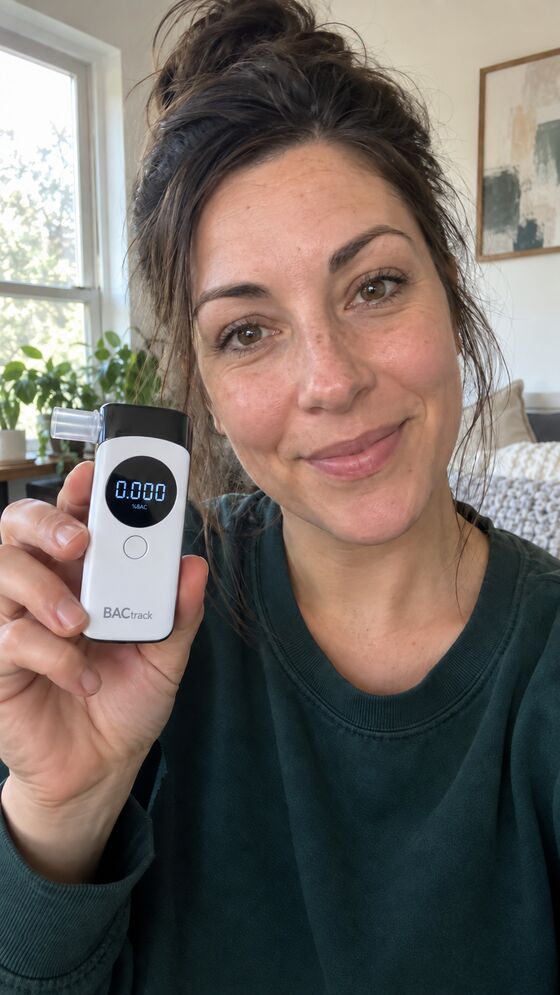
- Spoken words, issued 07:51
- harbor · quilt · seventeen
- Reading on the device
- 0.000 %BAC
- Device
- BACtrack C8, standalone mode
- 0:04Words heard: harbor, quilt, seventeen. Face visible.
- 0:19Breath sample. Device in frame.
- 0:41Final screen readable: 0.000.
- —Editing check: no indicators detected.
ClearedNot clearedInconclusive
Example data. Not a real client.
Inconclusive
Example client
Reviewed · inconclusiveRequested 19:00 · due 20:00 · recorded 19:21 · received 19:22
- Spoken words, issued 19:20
- meadow · copper · forty-one
- Reading on the device
- Not readable
- Device
- Glare across the display at 0:38
- 0:03Words heard. Face visible.
- 0:17Breath sample. Device partly out of frame.
- 0:38Final screen not readable.
- —Editing check: no indicators detected.
ClearedNot clearedInconclusive
Coach note: “Screen unreadable. Retest requested for tonight with fresh words.”
Example data. Not a real client.
Anyone set to receive results was told a video arrived. An inconclusive decision sends nothing further; the retest is a new request with new words.
Inside a record package
Open any test and choose Export record package. You get one ZIP file with:
- Every original recording for that test, byte for byte
- A printable summary of the test
- Every saved decision, each version, with who made it
- The AI observations and their timestamps
- When the request was sent, when it was due, and when the video arrived
- The messages sent to the client, with personal details removed
- A checksum file, so anyone can confirm the files haven't changed since export
- The list of what Daylight does not claim
Checksums show the files are the same ones Daylight exported. They don't prove who is on camera.
Start with one client.
Create an account, add a client, and walk through the first check-in together on a call. The guided setup never sends a message you haven’t seen.